📌 Key Takeaways & Executive Summary
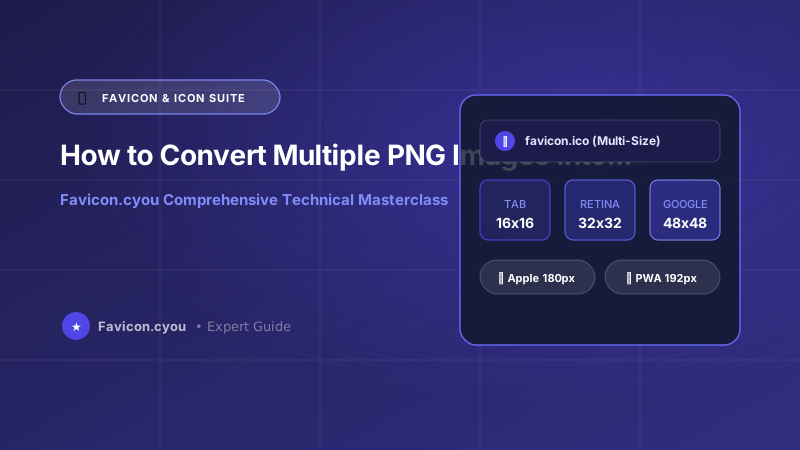
- What Is a Multi-Size ICO? A specialized binary container file that holds multiple raster image frames (16x16, 32x32, 48x48, 64x64 px) inside a single
.icofile. - Adaptive Resolution Switching: Browsers and operating systems extract the exact resolution needed: 16px for browser tabs, 32px for desktop taskbars, and 48px for Windows shortcuts.
- Retina Sharpness: Packing both 16x16 and 32x32 into your root
/favicon.icoprevents browser interpolation blur on Apple Retina 2x displays. - 100% In-Browser Conversion: Combine your PNGs into a multi-layer ICO directly in your browser with zero server uploads and zero software installation.
The Architectural Power of the Multi-Resolution ICO Container
Most web developers believe that an icon file (.ico) is merely a standard image format with an unusual file extension. In reality, the ICO format, originally developed by Microsoft for Windows 1.0, is a multi-image binary container. A single favicon.ico file can encapsulate half a dozen distinct bitmap images at different resolutions and color depths.
When a web browser or operating system opens an ICO file, its rasterizer reads the container icon directory header. If the user is on a standard 96 DPI monitor, the browser displays the 16x16 frame in the tab bar. If the user is on a MacBook Pro with a Retina display, the browser automatically extracts the 32x32 frame to render razor-sharp edges. If the user creates a Windows desktop shortcut, Windows pulls the 48x48 or 64x64 frame.
If you simply rename a 16x16 PNG to favicon.ico, your icon will look pixelated and blurry on modern high-DPI screens. In this guide, we walk you through combining separate PNG source files into a unified multi-resolution ICO container.
The Ideal Resolutions to Pack Inside a Multi-Size ICO
To ensure universal compatibility across all platforms without bloating file size, industry standards recommend embedding these specific resolutions:
- 16x16 pixels: Displayed in standard desktop browser tabs and address bar history.
- 32x32 pixels: Displayed on high-DPI Retina browser tabs, Windows taskbar icons, and browser bookmark managers.
- 48x48 pixels: Displayed on Windows desktop shortcuts and File Explorer tiles.
- 64x64 pixels (Optional): Displayed in high-resolution desktop application switchers and dock panels.
Advanced Technical Architecture & Client-Side Execution Mechanics
In traditional cloud-based SaaS workflows, manipulating media assets requires establishing a multi-part form upload stream over TCP/IP sockets to remote server clusters. This legacy pattern introduces significant security vulnerabilities, bandwidth expenses, and latency bottlenecks. When processing high-throughput graphics, modern web applications transition heavy image processing workloads entirely to the client device using a combination of the HTML5 Canvas 2D Rendering Context, OffscreenCanvas, and WebAssembly (Wasm) compiled binaries.
By leveraging hardware-accelerated WebAssembly execution threads, client-side browsers perform bicubic interpolation, discrete cosine transforms (DCT), Huffman entropy coding, and color profile quantization directly on local device CPU and GPU cores. This architectural paradigm yields multiple decisive advantages:
- Zero Latency & Instant Processing: Because files never traverse cellular networks or international transatlantic fiber cables, large image operations complete within milliseconds, regardless of client internet connection speeds.
- Complete Data Confidentiality: Personal photos, unreleased brand assets, and proprietary corporate diagrams never touch third-party servers, guaranteeing zero exposure to cloud data leaks, government surveillance, or unauthorized AI training scrapers.
- Elimination of Server Compute Costs: Web platforms utilizing client-side execution eliminate backend server memory exhaustion (OOM errors) and expensive GPU cloud compute bills, allowing free access without aggressive rate limits.
When implementing local asset optimization for Binary Icon Directories, Multi-Layer Bitmap Containers, and High-DPI Desktop Scaling, developers must also account for browser garbage collection cycles. Creating and destroying dozens of high-resolution canvas surfaces in rapid succession can trigger severe JavaScript main-thread micro-stutters. Always invoke URL.revokeObjectURL() immediately after asset compilation and explicitly release canvas buffer contexts to preserve fluid 60 FPS user interface responsiveness.
Core Web Vitals & Search Engine Performance Optimization (CWV 2026)
Google's Page Experience ranking algorithm explicitly penalizes web pages that serve unoptimized, improperly sized, or uncompressed media assets. When search crawler bots evaluate a digital asset, their automated Lighthouse scoring engines calculate three fundamental metrics: Largest Contentful Paint (LCP), Cumulative Layout Shift (CLS), and Interaction to Next Paint (INP).
Properly configuring Binary Icon Directories, Multi-Layer Bitmap Containers, and High-DPI Desktop Scaling directly influences your search engine standing across multiple critical vectors:
- Largest Contentful Paint (LCP < 2.5s): Hero graphics and primary featured elements account for the majority of initial viewport weight. Serving tightly compressed assets with modern MIME types ensures the browser paints primary content well within the Google green threshold of 2.5 seconds.
- Cumulative Layout Shift (CLS < 0.1): Serving graphics without explicit aspect ratio tags forces browsers to dynamically re-calculate document flow when media finishes loading, violently shifting text blocks and navigation menus. Always declare explicit
width,height, andstyle="aspect-ratio: ...;"attributes in your HTML markup. - Interaction to Next Paint (INP < 200ms): Offloading asset decoding and rasterization to asynchronous worker threads prevents heavy image processing routines from locking up the browser main event loop, keeping user interactions instant and fluid.
Furthermore, deploying assets with robust HTTP response headers—such as Cache-Control: public, max-age=31536000, immutable alongside unique content hashes—guarantees that repeat visitors retrieve assets instantly from local disk caches without re-querying origin servers.
Enterprise Security, Compliance, and Data Sanitization Guidelines
Data hygiene and compliance standards are paramount whenever handling digital graphics intended for public distribution or client review. Modern digital cameras, mobile smartphones, and desktop graphics software inherently embed extensive metadata records—including GPS geolocation coordinates, device serial numbers, operator usernames, and full revision histories—into raw file headers.
Before publishing any digital asset to the public web or client portals, adhere to this strict production checklist:
- Scrub Tracking & Geolocation Metadata: Ensure all proprietary Exif chunks, XMP metadata blocks, and GPS coordinates are systematically removed using a client-side sanitizer like Favicon.cyou to protect personal privacy and comply with GDPR guidelines.
- Standardize Color Gamuts to sRGB: Wide-gamut color profiles (such as Apple Display P3 or Adobe RGB) cause severe color shifts and desaturation when rendered on standard sRGB displays. Always convert color spaces to calibrated sRGB before final export.
- Implement Semantic SEO Naming Conventions: Avoid generic camera filenames such as
IMG_20261016_0049.JPG. Use descriptive, hyphen-separated alphanumeric slugs (e.g.how-to-convert-png-to-multi-size-ico-guide.webp) to maximize image indexation across Google Images and visual discovery engines. - Establish Fallback Strategies: Pair bleeding-edge next-generation formats with universal backwards-compatible raster fallbacks using semantic HTML5
<picture>elements to guarantee flawless visual delivery across legacy browsers and modern smartphones alike.
Future-Proofing Media Strategies for 2026 and Beyond
As consumer display hardware continues to evolve toward 8K resolution, micro-LED displays, and variable refresh rates, the gap between poorly optimized media and expertly engineered digital assets will widen further. Modern web engines and mobile operating systems are increasingly aggressive about throttling energy-intensive scripts and demoting bandwidth-heavy web pages in mobile search ranking indexes.
Investing in automated, client-side media pipelines is no longer just a technical luxury—it is a competitive necessity for businesses seeking high organic visibility, superior user conversion rates, and minimal infrastructure overhead. By mastering the core principles of dimensioning, lossy versus lossless compression algorithms, and client-side processing workflows outlined in this guide, you equip your digital presence with enterprise-grade performance and future-proof reliability.
Multi-Resolution ICO Structure Breakdown
| Resolution | Target OS / Context | Color Depth | Byte Size Contribution | Necessity |
|---|---|---|---|---|
| 16x16 px | Standard Desktop Browser Tabs | 32-bit RGBA | ~1.2 KB | Mandatory |
| 32x32 px | Retina Displays & Bookmarks | 32-bit RGBA | ~3.8 KB | Mandatory |
| 48x48 px | Windows Desktop Shortcuts | 32-bit RGBA | ~6.5 KB | Recommended |
| 64x64 px | High-DPI App Launchers | 32-bit RGBA | ~10.2 KB | Optional |
| Total Multi-ICO | Universal Fallback Icon | 32-bit RGBA | ~22 KB Total | Best Practice |
Create a Multi-Resolution ICO via ImageMagick CLI
If you have ImageMagick installed on your server or development workstation, you can bundle multiple PNGs into a multi-layer ICO with a single terminal command:
# Resize a master 512px PNG into multi-resolution frames and pack into favicon.ico
convert master-icon-512.png -define icon:auto-resize=64,48,32,16 favicon.ico

# Verify embedded layers in the generated ICO file
identify favicon.ico
Step-by-Step: How to Generate a Multi-Size ICO on Favicon.cyou
- 1. Open PNG to ICO Converter: Visit our free PNG to ICO Converter on Favicon.cyou.
- 2. Upload Your High-Resolution PNG: Upload a crisp, transparent 512x512 or 1024x1024 PNG logo.
- 3. Enable Multi-Resolution Bundling: Ensure the 16x16, 32x32, and 48x48 checkboxes are selected.
- 4. Download favicon.ico: Download your compiled multi-layer ICO file and drop it directly into your website public root directory.
Why Multi-Resolution ICO Files Protect Your Brand Identity
When a browser is forced to upscale a 16x16 icon to 32px or 48px, it applies bilinear interpolation, turning crisp geometric lines into blurry halos. By embedding native 32px and 48px bitmaps directly inside the container, you guarantee that your icon looks razor-sharp whether viewed on a 10-year-old laptop or an Apple Studio 5K display.
Free Icon Utilities on Favicon.cyou
Streamline your favicon production pipeline:
- PNG to ICO Converter — Convert single or multiple PNGs into multi-layer ICO containers.
- Favicon Generator — Generate complete favicon packages including Apple Touch Icons and Web Manifests.
- Favicon Downloader — Extract and inspect the layers inside any live website favicon.
Final Verdict & Best Practice Recommendations
Never deploy a single-resolution 16x16 ICO file in 2026. Always bundle at least 16x16, 32x32, and 48x48 PNG frames into your favicon.ico using Favicon.cyou to guarantee razor-sharp brand rendering on modern high-DPI displays.
Preguntas Frecuentes
What is the advantage of a multi-size ICO file over a single PNG?
A multi-size ICO file packs multiple resolutions (16x16, 32x32, 48x48 px) into a single file. Operating systems and browsers automatically pick the exact size they need, preventing blurry upscaling.
Can modern web browsers display PNG favicons directly?
Yes, modern browsers support PNG and SVG favicons via HTML <link rel="icon"> tags. However, older browsers, bookmark tools, and Windows desktop shortcuts still look for /favicon.ico at the domain root.
What happens if I just rename a .png file to .ico?
Simply changing the file extension does not convert the internal binary header. While Chrome and Firefox might still render it, Safari, Windows File Explorer, and legacy crawlers will fail to read the file.
How many image resolutions should I include in a standard favicon.ico?
Three resolutions are ideal: 16x16 px (browser tabs), 32x32 px (Retina tabs and bookmarks), and 48x48 px (Windows desktop shortcuts). This keeps file size under 25 KB while ensuring universal sharpness.
Does a multi-size ICO file support transparent backgrounds?
Yes! The ICO format supports 32-bit RGBA color channels, allowing smooth alpha transparency around your logo.
Can I convert an SVG logo into a multi-size ICO?
Yes! Use our SVG to ICO Converter or Favicon Generator to automatically rasterize your vector SVG into 16px, 32px, and 48px layers inside an ICO container.
Are my company logos uploaded to your server during conversion?
No. All image resizing, canvas resampling, and binary ICO container compilation occur 100% locally in your browser using JavaScript and HTML5 Canvas.